

People rarely leave a site because they “didn’t like the vibe.” Most of the time, they leave because something felt slow, clunky, or unreliable, and they did not trust the next step. That matters because conversion is an emotional decision disguised as a rational one. If your pages hesitate, visitors hesitate too.
This is why load experience is not a technical vanity metric. It is part of persuasion. It shapes first impressions, reduces friction, and keeps intent from leaking out of your funnel before the visitor even sees your offer.
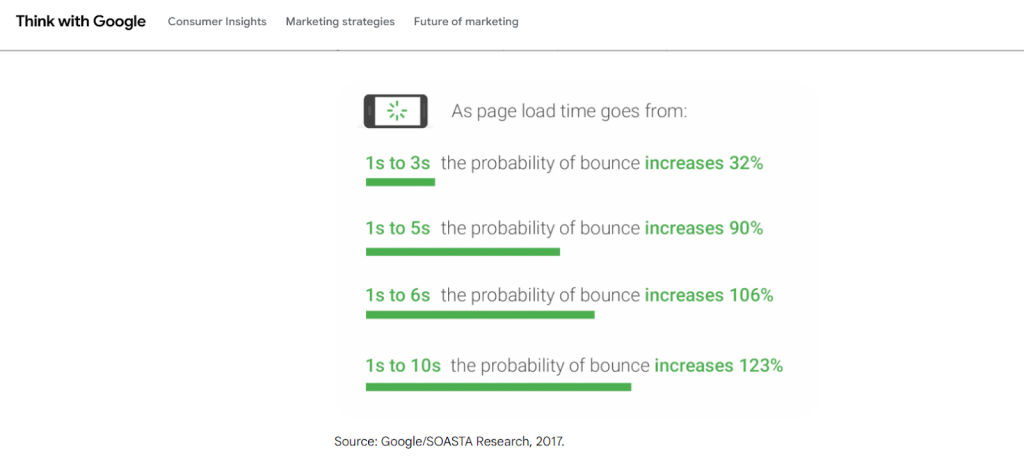
Google’s own research has shown how sharply user behavior changes as load time grows. As mobile page load time increases from 1 second to 10 seconds, the probability of a visitor bouncing rises dramatically.
The conversion math behind “fast”
Conversion rates drop for two reasons when a page is slow.
First, impatience: the visitor never fully arrives. They bounce, and you lose the chance to persuade.
Second, doubt: the visitor arrives, but the experience feels unstable, delayed, or glitchy. That reduces trust in checkout flows, form submissions, scheduling widgets, and even simple CTA clicks.
This is why the “speed problem” is not only about the first render. It is also about what happens after the page appears:
- Does the page shift around while loading?
- Does the button respond instantly when tapped?
- Does the page stutter when the user scrolls?
- Do images and embeds load smoothly without blocking the main content?
Google groups these ideas into Core Web Vitals (more on this later), which focus on loading, interactivity, and visual stability.
The business impact is measurable
When you improve load experience, you usually see a lift in funnel progression, not just a prettier score.
A well-known Deloitte study on mobile sites found that small speed improvements correlated with meaningful gains, including conversion lifts in retail and travel.
Akamai’s research on online retail has also highlighted that even tiny delays can reduce conversion rates, reinforcing that milliseconds matter when users are deciding whether to buy or bail.
You do not need to be an ecommerce brand for this to apply. Lead-gen sites feel it too: every delay adds friction between “I’m interested” and “I submitted.”
What “fast enough” means in real terms
Rather than chasing a perfect performance score, it’s smarter to aim for a site experience that feels immediate, stable, and responsive on real devices. In practice, that means you want your most important content to appear quickly, your page to react instantly when someone taps or clicks, and your layout to stay steady while assets load.
Google’s Core Web Vitals are useful here because they translate “feels fast” into measurable outcomes:
- Largest Contentful Paint (LCP) captures how quickly the main content becomes visible.
- Interaction to Next Paint (INP) reflects how responsive the page is after a user interacts.
- Cumulative Layout Shift (CLS) measures how much the page jumps around while loading. When those three are in a healthy range, users stop noticing the site and start focusing on the offer, which is exactly where you want their attention.
What to optimize, and how does it affect conversions?
| What users notice | What it usually indicates | What it breaks in a funnel | High-impact fixes |
| “The main content takes forever to show up” | Heavy images, slow server response, render-blocking code | Bounce rate, ad ROI, trust in the brand | Image compression, caching, CDN, reduce render-blocking scripts |
| “I tap and nothing happens” | Long JavaScript tasks, overloaded main thread, third-party scripts | Form submissions, checkout clicks, booking widgets | Reduce JS, defer non-critical scripts, remove unused tags, code-split |
| “The page jumps around while loading” | Layout shifts from late-loading fonts, images without dimensions, injected banners | CTA mis-clicks, frustration, drop-offs mid-scroll | Set image dimensions, reserve space for embeds, font loading strategy |
| “Scrolling feels laggy” | Too much client-side work, heavy animations, inefficient components | Lower engagement, fewer page views, less CTA exposure | Simplify motion, optimize components, reduce DOM and script weight |
| “Mobile feels slower than desktop” | Large payloads, unoptimized images, too many assets, weak mobile CPU | Mobile conversion rate, local lead volume | Mobile-first asset budgets, lighter layouts, remove heavy plugins |
If you want a broader perspective on what makes pages convert beyond technical factors, our guide on how to design a website that converts can help.
The hidden culprits that quietly kill conversions
Many sites “look fine” to the owner but still feel slow to users. Common causes are not always obvious.
1) Heavy hero sections that block the first meaningful view
A hero section is supposed to do one job: confirm the visitor is in the right place and lead them toward the next action. When it relies on a background video, sliders, or oversized images, it often delays that “first clear message” moment by forcing the browser to download and render heavy assets before the page feels ready.
On mobile, that delay is amplified because devices have less processing power and slower connections, so the hero can feel like it’s loading in pieces. Even when the content eventually appears, visitors may already be mentally checked out because the experience felt slow or uncertain.
The clean fix is usually simplifying the hero, using a compressed image instead of video, and ensuring the text and CTA are visible immediately without waiting for anything fancy to load.
2) Too many third-party scripts
Third-party scripts are one of the fastest ways to turn a decent site into a sluggish one because they add extra network requests and extra work for the browser’s main thread. Many of these scripts also load at the same time, competing with your core page content and delaying interactivity right when the visitor tries to scroll, tap a button, or submit a form.
The bigger issue is that they are often added “just in case” and then forgotten, so your site ends up carrying tools no one is actively using. Some scripts inject elements late, causing layout shifts that make the page feel unstable and frustrating to navigate.
The best approach is a quarterly audit: remove what you don’t need, delay non-essential scripts until after user interaction, and prioritize only the tools that clearly contribute to leads or sales.
3) Font loading and layout instability
Custom fonts can quietly hurt conversions when they delay readable text or cause the page to shift once the font finally loads. Users might see a flash of one font and then another, or they might see blank text briefly, both of which make the site feel less polished and less trustworthy.
Layout instability is especially harmful around headlines, pricing, and CTA sections because even small shifts can change what a user clicks or disrupt their reading flow. The “janky” feeling often comes from font swapping, missing size fallbacks, or loading unnecessary font families and weights.
A practical solution is to limit font weights, use modern font formats, preload the most important font files, and ensure fallbacks closely match sizing to reduce shifting.
4) Cheap hosting or misconfigured caching
If your hosting is slow, every visitor starts at a disadvantage because the server takes too long to respond before the browser can even begin building the page. This is why people sometimes blame “design” for low conversions when the real problem is the site feeling sluggish from the first request.
Misconfigured caching makes it worse because returning visitors and repeat page views still have to fetch assets that should be stored and reused, so the site never feels snappy. This hits hardest on high-intent pages like service pages and checkout flows, where delays feel risky and reduce trust.
Upgrading hosting, enabling proper page and browser caching, and using a CDN for static assets usually creates a noticeable improvement without changing the site’s look at all.
5) Overbuilt pages
Overbuilt pages try to answer every question at once, which often leads to bloated layouts, too many sections, and heavy scripts powering animations or interactive elements. Even if the page loads eventually, it can feel slow because the browser is doing too much work to render, animate, and respond to scrolling.
From a conversion standpoint, overbuilding also creates decision fatigue because visitors have to sift through excessive information before finding the point and the CTA. Mobile users feel this most because long pages with heavy elements are more likely to stutter or lag as they scroll.
Clean, intentional pages convert better because they load smoother, guide attention more clearly, and keep the visitor focused on one next step instead of ten.

A practical optimization plan that improves conversions
This is the prioritization that tends to move real business metrics, not just lab scores.
Step 1: Measure with two lenses, lab and real users
Use a lab tool for debugging and field data for reality. Google’s Core Web Vitals reporting is grounded in real-user measurement, which helps you prioritize what visitors actually experience.
Step 2: Fix the biggest “first impression” blockers
Focus on:
- Compressing and resizing images (especially hero images)
- Enabling caching
- Using a CDN where it makes sense
- Reducing render-blocking scripts and CSS
Step 3: Improve responsiveness on key pages
Prioritize your highest-intent pages first:
- Service pages with “Book” or “Get a Quote”
- Landing pages used for ads
- Checkout or booking flows
- Contact pages with forms and maps
INP improvements are often about reducing long tasks and trimming JavaScript overhead.
Step 4: Stabilize layout so users do not fight the page
CLS fixes are usually straightforward but highly noticeable:
- Set width and height for images
- Reserve space for embeds
- Avoid injecting banners above content without space reserved
- Use font loading strategies that reduce shifting
Step 5: Treat speed as a conversion asset, not a one-time project
The fastest sites stay fast because they adopt simple habits:
- Add new plugins carefully, and remove what you do not use
- Keep image guidelines for your team
- Audit tags quarterly
- Monitor your key templates, homepage, service page, and top landing pages
If you want a broader design-and-clarity framework that aligns with modern conversion priorities, the Freelancers HUB 2026 web design guide can come in handy.
How to talk about speed work in conversion terms
If you’re pitching improvements internally or explaining them to a client, avoid making the conversation about “scores” as the main outcome. Scores are useful, but stakeholders care most about what changes in the business.
The clean way to frame performance work is as friction removal across the funnel: faster pages tend to reduce wasted paid traffic by lowering bounce rates, increase form completions by keeping users engaged long enough to submit, and improve booking or checkout completion by making interactive steps feel reliable.
This is also where authority-backed benchmarks make your case stronger, because they show this isn’t personal opinion. Google’s research on load time and bounce behavior supports the idea that delays directly increase abandonment, and Deloitte’s speed research reinforces that even small improvements can correlate with meaningful lifts in engagement and conversion outcomes.
FAQs
Yes, because design gets the click, but the experience earns the conversion. Slow pages cause lost intent before your messaging has time to work.
No. Core Web Vitals are user-experience metrics first. Better user experience tends to improve conversion behavior, regardless of rankings.
Start with revenue and lead drivers: homepage, top service pages, ad landing pages, booking flows, and contact pages.
Fast enough is when the site feels immediate and stable on mobile, especially on a mid-range device and average connection, not just on a developer laptop.
Speed is conversion insurance
When your site loads smoothly, responds instantly, and stays stable, you remove invisible objections. Visitors feel in control. They trust the next click. That trust compounds across every channel: SEO, paid ads, social traffic, referrals, and direct visits.
If you treat speed work as conversion work, you stop chasing vanity scores and start building a site that consistently turns attention into action. Do you need to understand this in a more elaborate way?
We are very happy to help! Book a free consulting session with Freelancers HUB at a time that works for you, and voila!
